Put every device at your AI’s command.
Build a team of AI agents that work for you — in your browser, on your computers and in the cloud. Give each its own model, tools and skills, chat with them all in one shared Hub, and hand off tasks they run on their own: now, later, or every morning.
macOS 12 or later · Apple Silicon or Intel · 15 MB · Free · Your AI keys stay encrypted on your computer
Also available for Windows — download Wysebee-1.1.1-setup.exe (10 MB)
How it works
Set up one computer.
Command it from anywhere.
Four steps, and the agent on this computer answers wherever you are — in the cloud, at another desk, or in the AI app you already use.
- 01
Install Wysebee Desktop
Download the app for macOS or Windows on the computer you want your agent to work on. It installs and keeps the browser extension up to date for you, so the agent can work in your own Chrome or Edge.
One download
- 02
Sign in and add an AI provider
Sign in with your Wysebee account, then add a key from OpenAI, Anthropic, Google Gemini and others — or point it at a local model through Ollama or LM Studio. Already use Claude or ChatGPT? Skip the key and connect your agent to that app instead.
Skippable with Claude or ChatGPT
- 03
Give your agent the tools it needs
From the agent's Tools tab, add exactly what its jobs call for: your browser, a folder of documents, a local program, a SQLite or PostgreSQL database, or a Docker container. Nothing it isn't given.
Only if needed
- 04
Command it from anywhere
That's it. Talk to this computer's agent from Wysebee Cloud on the web, from your other computers, or from Claude and ChatGPT — and it does the work right here, with the tools you gave it.
Cloud or any desktop
Teach it a job, once
A skill is a folder of instructions, and optional scripts, for a particular job. Write it once, tick which agents have it, and it syncs through Wysebee Cloud to every computer — so you explain the quirks of your admin panel once instead of every session. You never need one to get started.
Any provider
Bring your own model.
Or don't bring one at all.
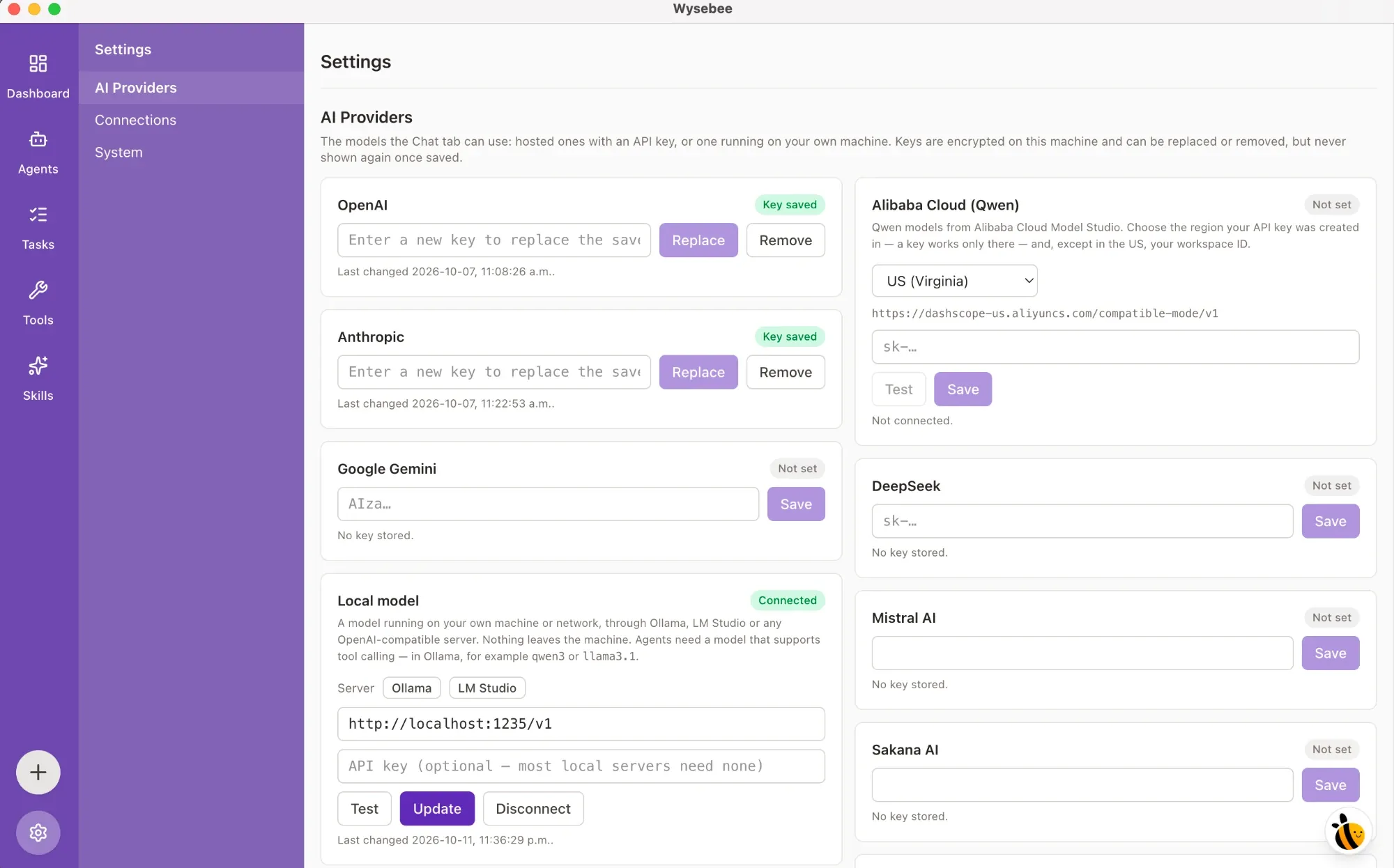
Paste a key from whichever provider you already pay for — or point Wysebee at a model running on your own machine and skip the key entirely. Same agent, same tools, same screen; only the brain changes.
Hosted, with a key
- OpenAI
- Anthropic
- Google Gemini
- Alibaba Cloud (Qwen)
- DeepSeek
- Mistral AI
- Sakana AI
Keys are encrypted on this machine. They can be replaced or removed, but are never shown again once saved — not in the UI, and not to the agent.
Local, with no key
Ollama · LM Studio
Or any OpenAI-compatible server on your machine or your network. Point Wysebee at the URL, leave the key blank, and nothing leaves the machine — not the prompt, not the page the agent read, not the rows it queried.
Pick a model that supports tool calling — in Ollama, qwen3 or llama3.1.
It runs on your machine.
Wysebee Desktop turns your computer into a set of nodes — named bundles of tools you build by filling in a form — and gives your agent exactly those, and nothing else. The work happens where you can see it, on hardware you own.
macOS 12 or later · Apple Silicon or Intel · 15 MB · Free · Analytics off with one switch
Also available for Windows — download Wysebee-1.1.1-setup.exe (10 MB)
One account, every device
Sign in with your Wysebee account, and your agents, conversations, tasks and skills follow you to every computer — and to the Wysebee website, from any browser.
Your own tools, in a few clicks
Pick a Wysebee tool template — a folder of documents, a local program, a SQLite or PostgreSQL database, a Docker container — fill in a few fields, and your agent can use your own data and commands.
No code, anywhere
No SDK to learn, no server to write, no selectors to maintain, and no deploy step between you and a working agent.
Your keys stay yours
AI keys, browser connections and database passwords are encrypted on your computer and never sent to Wysebee Cloud. Wysebee opens no ports unless you ask it to.
FAQ
Questions we get asked
What does Wysebee actually do?
It gives you a team of AI agents that work across your devices. Each agent gets its own model, tools and skills: your own Chrome or Edge, signed in to your sites; a folder, program or database you choose on one of your computers; or a home in Wysebee Cloud, where it keeps answering when your computers are off. You talk to them in a shared Hub or one to one, and they carry out tasks on their own — right away, at a set time or on a schedule. You stay in charge: Wysebee asks before acting on a site you haven't trusted.
How do I get set up?
Four steps. Install Wysebee Desktop on the computer you want your agent to work on — it adds and updates the browser extension for you. Sign in with your Wysebee account and add an AI provider, or skip the key if you would rather use the agent from Claude or ChatGPT. Give the agent any extra tools it needs. Then talk to it from Wysebee Cloud on the web, from your other computers, or from your own AI app.
Do I need to know how to code?
No. You talk to your agents in plain language, the way you would message a colleague. Tools come from templates — pick one, fill in a few fields such as a folder or a database address, and tick which agents can use it. There is no SDK to learn, no server to write and nothing to deploy.
What can my agents use besides the browser?
Whatever you give them, one tool at a time. In the browser, your own Chrome or Edge, signed in to your sites, plus web development tools. On your computers, a folder of documents (text, Word, Excel, PDF), a local program you define, a SQLite file, your PostgreSQL servers or a Docker container. Each agent gets only the tools you tick for it, and the Tools page shows which agent has what.
Can my agents work while my computers are off?
Yes, if they live in Wysebee Cloud. You choose a home for each agent: one of your computers, or Wysebee Cloud. A cloud agent answers at any time using AI keys you keep on the Wysebee website. An agent that lives on a computer does its work there, with the tools on that machine, whenever that computer is running — and you can reach it from anywhere.
Can I use my agents from Claude, ChatGPT or Cursor?
Yes. On any agent's Connect AI app tab, add it as a connector in Claude or ChatGPT on the web through Wysebee Cloud, or serve it on your computer to Claude Code, Cursor, VS Code and other MCP apps with a ready-made command. Every browser action still goes through the extension's per-site approvals.
Can I see what the agent is doing?
Yes. Each answer shows the tools it used, folded into a "Used N tools" group you can open, with screenshots inline. In the browser, a red pointer shows where the agent is working. You can stop an answer at any time, and an agent can ask you in a thread to confirm something before it acts.
Can the agent read or write files on my computer?
Only in folders you choose, and only read-only unless you allow changes. The same goes for databases. Programs run exactly as you defined them and never through a shell. When a chat from the browser side panel wants to use anything beyond the browser — a program, a folder, a database or a skill's script — Wysebee asks you on the desktop first: Allow once, for 10 minutes, or Deny.
What is a skill, and do I need one?
You do not need one to start. A skill is a folder of instructions, and optional scripts, for a particular job. Create one or add an existing folder on the Skills page, then tick which agents have it. Skills sync through Wysebee Cloud so all your computers have them, and files that look like secrets are never uploaded.
Which AI model does it use?
Whichever you choose, per agent. Add a key for OpenAI, Anthropic, Google Gemini, Alibaba Cloud (Qwen), DeepSeek, Mistral AI, Sakana AI or Sakura AI Engine — keys are encrypted on your computer and never sent to Wysebee Cloud. Set a key up on one computer and your others can use it through that one. Or run a local model through Ollama, LM Studio or any OpenAI-compatible server. Pick a model that supports tool calling; in Ollama, qwen3 and llama3.1 both do.
Is it really free?
Yes. Wysebee Desktop is free to download and use. You sign in with a free Wysebee account and bring your own AI key — or a local model, which costs nothing to run.
Which platforms does it support?
macOS 12 or later on Apple Silicon or Intel, and Windows 10 or later on 64-bit. The Mac build is Developer ID signed and notarized by Apple, so it opens with no Gatekeeper warning. The Windows installer, app and uninstaller are Authenticode-signed with an EV certificate and timestamped, so Windows names Wysebee Inc. as the publisher instead of warning about an unknown one — and it installs for your user only, with no administrator prompt. A Linux build is not available yet.
Where does my data go?
Your agents, conversations, tasks, reminders, skills and settings are kept in Wysebee Cloud, so they follow you to every computer and to the Wysebee website. Your AI keys, browser connections and database passwords are different: they are encrypted on your computer and never sent to Wysebee Cloud. Skill files that look like secrets are never uploaded, and usage analytics never include what you type, the pages you visit or the names of your agents, tasks and tools — one switch in Settings → System turns them off.
How do I get help?
Join the Discord. That is where questions get answered, rough edges get reported, and what ships next gets decided. Bugs and feature requests for the desktop app can also go to the GitHub issue tracker.
Come build with us.
No forms, no pitch deck, no sales call. The Discord is where the questions get answered, the rough edges get reported, and what ships next gets decided.
Free to download. Sign in, add a model key, and your first agent is ready in minutes.